

We were having frequent hardware issues on our Dell PowerEdge R630 hyper converged servers and the Dell Support recommended in upgrading the Avago (LSI) Dell PERC H730 Mini Controller Driver and Firmware to the latest version.
|
Avago (LSI) Dell PERC H730 Mini |
Existing Version |
Dell Recommended |
|
Firmware |
25.5.2.0001 | |
|
Driver |
6.910.18.00 |
7.703.18.00-1OEM |
Note: The procedure of upgrade is applicable and tested on vSphere 6.5 U1 or vSAN 6.6 environments
We were running the support Driver/Firmware as all vSAN Health checks were green. However, there was a latest build available which included few additional fixes. Let me show you how easy it was to update the Storage Controller Drivers and Firmware using the VMware Update Manager and vSAN Configuration Assistant Upgrade Tool.
The Sequence that we need to execute is as follows:
- Upgrade the Driver – LSI_mr3 VIB driver using the VMware Update Manager
- After doing the above step you will start seeing the Controller Firmware and Avago Management Tool listed in the vSAN Configuration Assistant Update Tool
Step 1 – Sync Cluster to Perform Online Test
Add the my.vmware.com account in the vCenter to enable checking/sync with the online engine
- Enter the Username and Password


Step 2 – Update Storage Controller Driver
The VMware Update Manager (VUM) will perform the Controller Driver Update in rolling reboot fashion one ESXi Host at a time
- Select the Cluster and Choose the lsi_mr3: Avago Native MegaRAID SAS driver

- Click on the Remediate Button
- Select VSAN Cluster under Baseline Groups and the VIB Driver LSI under Baselines
- Click Next

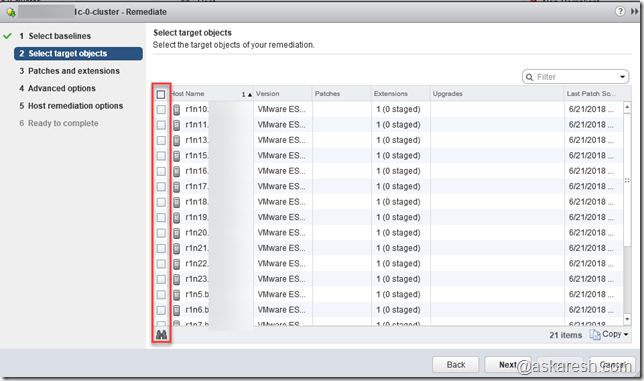
- Select all the Host in the Cluster (E.g. If you want to perform a quick test you can select one-host). In our case we selected all the 21 hosts
- Select the Package

- Click on Ignore warning

- Select Do Not Change Power State and leave the timings to defaults

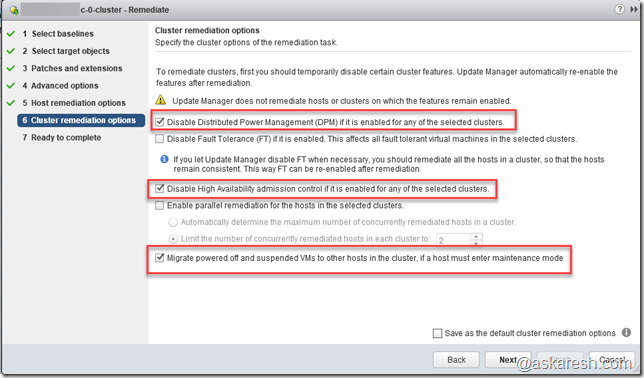
- Select the three options as below
- Disable DPM
- Disable HA admission control
- Migrate Powered-off VM
- Click Finish
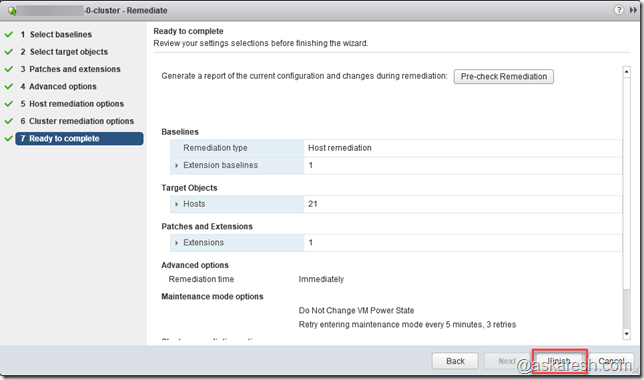
- Click on Pre-check Remediation and see the current configuration
- The upgrade will start in a rolling reboot (1-by-1)
-
Make sure to verify the versions of the driver is showing updated/passed in the VSAN health tests
Step 3 – Storage Controller Firmware
Once the Driver is installed the Controller Management Tools and Firmware for Avago get listed together in the vSAN Configuration Assistant Update tool.
Both the components get installed onto the ESXi host together:
- Click on Download and that will turn the status in Ready to install
- Click on the Update All and select the second option Rolling reboot (one host at a time)
- Install the Firmware on all the ESXi Host within the cluster.

-
Make sure to verify the versions of the firmware is showing updated/passed in the VSAN health tests
Check the Up-time of the ESXi host (Check every 2 hours and update the tracker)
This step will enable you to track the progress of the cluster as on how many host are done. In our scenario for the Driver (8 hr) and Controller (8 hr) combined together for a 21 host cluster it took close to 16 hours. Off course this number will vary depending upon the cluster usage.
- Connect to the vCenter Linked mode
|
|
- Check the Uptime of ESXi Host
|
|
I hope you will find these steps useful in upgrading the VSAN Controller/Driver firmware easily using the Update Manager + Configuration Assist Update Tool. Let me know, if you have additional questions in the comments section.
Thanks,
Aresh Sarkari