

I had been intrigued by the Samsung DeX mode post its launch but didn’t have the courage to buy the 125$ (Rs. 10,000/- INR) Samsung DeX Station. I was on a look-out for an alternate Hub which could do the DeX mode on my Galaxy S8+ for a lot less. After searching @ AliExpress I finally managed to find a hub called EASYA Thunderbolt 3 USB C to HDMI Adapter DeX Mode for Samsung Galaxy S8/S9 which had some good positive reviews and for 33$
The moment of truth was to plug-in the Galaxy S8+ and try the DeX mode. Attempt-1: Managed to plug the phone to the hub and HDMI monitor as the output. Next thing I noticed was the screen mirror got enabled and DeX Mode pop-up wouldn’t come or get detected.
Attempt-2: Additional to the above I plugged in the Power in the USB-C 3.1 PD Port and magically the pop-up appeared on the phone “Start DeX Mode”
If you don’t have the wireless mouse plugged in the entire Galaxy S8+ screen acts like a mouse trackpad which can come-in handy.


Productivity with VMware Horizon:
The Horizon Client available on the Android Store has integration with DeX mode that enables you to use the Virtual Desktop in Full screen mode. I launch my Windows 10 Desktop and use it for an entire day. I was easily able to work on the following applications without any issues
- Microsoft Outlook Client
- Chrome and Firefox browser
- Skype for Business (Audio/Chat Only) – Video was having issues
- VMware Performance Tracker was showing the CPU and Network Bandwidth Usage graphs in real-time
- There was no lag or any sign of slowness in any form
- CPU Usage on the phone at an average of 4-6%
Known Observations:
- The phone didn’t heat all day during its usage
- The HUB was reasonably warm during the entire day usage
- The limited DeX compatible Application works good in full-screen
More Picture on the Usage
DeX Mode and Horizon Client Launch


DeX Mode and Full Screen – Windows 10 + Dell 24 inch Monitor


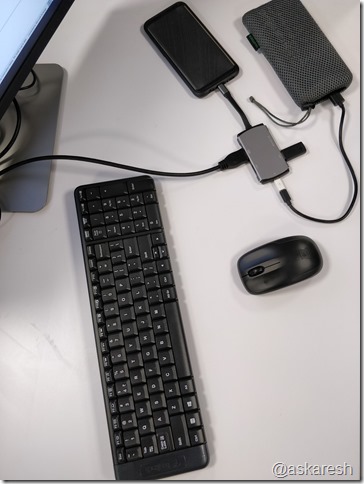
Hardware Setup – Logitech M140 Bluetooth Keyboard + Mouse

More Documentation on Samsung DeX + VMware Horizon
Using Horizon Client with Samsung DeX
Enable the DeX Mode Auto Launch Feature
I hope you find this HUB review and DeX mode usage with Horizon useful and will be able to use it as a daily driver. Let me know if you would like to know more in the comments section
Thanks,
Aresh