

Accidentally deleted user, computer account or OU’s from Active Directory. Don’t worry, now you can get them back using ADRestore tool using GUI interface.
Though there is a command line version of tombstone reanimation tool called adrestore – sysinternals, many people are not CLI savvies and having a GUI version of this functionality could really help them out.
Insight on tombstone: Reanimating Active Directory Tombstone Objects – By Gil Kirkpatrick
Gil Kirkpatrick’s article at Technet
Main features:
- Browsing the tombstones
- Domain Controller targeting
- Can be used with alternative credentials (convenient if you do not logon to your desktop as Domain Admin, which you should never do anyway)
- User/Computer/OU/Container reanimation
- Preview of tombstone attributes
Here are some sceenshots:
Enumerating tombstones 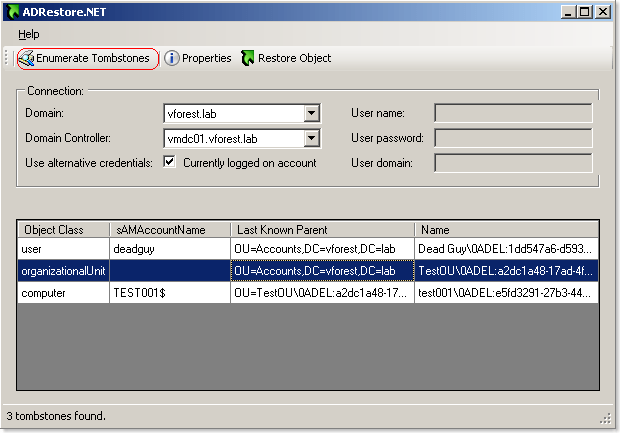
Previewing the tombstone attributes 
Restoring a deleted user account 
Notice that if you delete an OU with accounts in it, you will have to restore first the OUs the accounts were in, otherwise the reanimation of the child object will fail. It is not enough to create an OU with the same name as this will be a totally new object in AD and child object’s lastKnowParent attribute will still reference the deleted OU. Here is a walthrough:
Initial state: 
TestOU organizational unit is deleted: 
State of tombstones (notice that lastKnownParent attribute of user and computer accounts reference the deleted OU): 
OU is restored (lastKnowParent points to the restored OU’s distinguished name): 
Both computer and user accounts that resided in TestOU are reanimated: 
Download ADRestore.NET
Don’t forget to post your comments 🙂
Thanks,
Aresh
Useful Blogs:
ADRestore Rewrite: http://blogs.microsoft.co.il/blogs/guyt/
Reanimating Active Directory Tombstone Objects: http://technet.microsoft.com/en-us/magazine/cc137800.aspx